


はじめに:AIで「未来の街」を予測する
起業や新規事業、あるいは不動産投資において「エリア選定」は成功の鍵を握ります。「現在は賑わっているが、10年後はどうなるか?」「この駅は本当に利用者が増えているのか?」といった問いに対し、勘や経験だけで答えるのはリスクがあります。
今回は、国土交通省が提供する「不動産情報ライブラリAPI」と、ノーコードAI開発プラットフォーム「Dify」を組み合わせ、特定エリアの将来性を自動分析するAIエージェントを構築します。
住所を入力するだけで、将来の人口推計や駅の乗降客数トレンドを分析し、レポートを作成してくれる――そんな「専属の不動産アナリスト」をシステム化する手法を解説します。
活用するツールとデータの概要
1. 不動産情報ライブラリAPI(国土交通省)
国土交通省が提供するこのAPIは、不動産に関する膨大なデータの宝庫です。今回は特に以下のデータに着目します。
- 将来推計人口(500mメッシュ): 指定エリアの人口が将来どう変化するか(年齢層別の増減など)。
- 駅別乗降客数: 最寄り駅の利用者が増えているか、減っているか。
2. Dify(AIアプリケーション開発プラットフォーム)
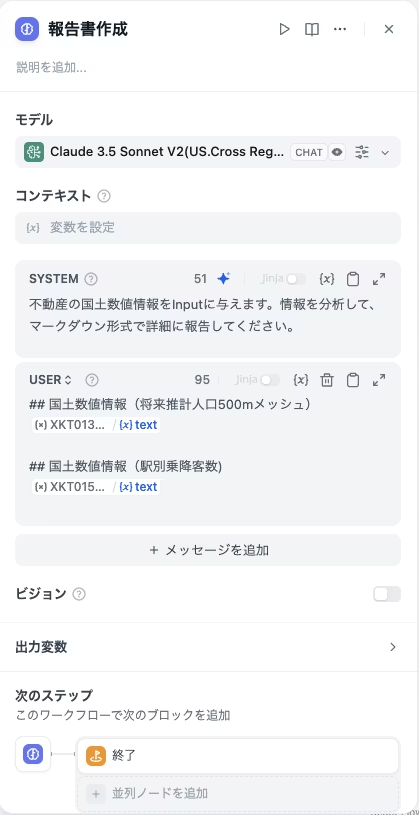
Difyを使用することで、APIから取得した生の数値データをLLM(大規模言語モデル)に渡し、「このデータから何が読み取れるか?」という高度な分析レポートを自動生成させることができます。
AIエージェントの設計:何を実現するか
既存の物件検索サイト(SUUMOなど)は「現在の物件情報」には強いですが、「エリアの将来性」や「詳細な分析」までは提供してくれません。そこで、本システムでは以下の付加価値を提供することを目指します。
- 将来の人口動態分析: 2020年から2050年にかけて、そのエリアの人口や世帯数がどう変化するかを予測・解説。
- 駅力(えきぢから)の分析: 周辺駅の乗降客数推移から、エリアの発展性や衰退リスクを考察。
システム構築のステップ
ここからは技術的な構築フローを解説します。最大の壁は「住所からAPI用の座標データへの変換」です。
STEP 1:座標変換機能の実装(AWS Lambda)
不動産情報ライブラリAPIは「緯度経度」や「タイル座標」を要求しますが、ユーザーは「東京都千代田区…」といった住所で検索したいはずです。
そこで、Amazon Location Serviceを利用して住所を座標に変換するAWS Lambda関数を作成し、API化します。
Amazon Location Serviceは、地図、ルート検索、ジオフェンス、追跡などの高度な位置情報機能を、アプリケーションへ安価かつ容易に実装できるサービスです。高品質なデータでグローバルな範囲をカバーします。
最大の特徴はデータの完全な制御権です。外部プロバイダーへのクエリは匿名化され、機密データはAWSアカウント外に漏洩しません。また、データが広告利用や販売されることがないため、プライバシーとセキュリティが強力に保護されます。
さらに、他のAWSサービス(IAMやCloudWatch等)とシームレスに連携でき、開発・デプロイの高速化や、運用監視、セキュリティ管理を効率化します。開発者ツールから簡単に位置情報データにアクセスでき、モニタリングおよび管理機能により、アプリケーションをより迅速に本番環境に移行できます。
以下は、住所を受け取り緯度経度(WGS84)を返すPythonコードの例です。
import boto3 import json import os

PLACE_INDEX = os.environ['PLACE_INDEX']

def fetchWGS(address: str): client = boto3.client('location') response = client.search_place_index_for_text( IndexName=PLACE_INDEX, Text=address ) if response['Results']: geometry = response['Results'][0]['Place']['Geometry'] return geometry['Point'][0], geometry['Point'][1] # x(経度), y(緯度) else: return None, None

def handler(event, context): # (中略: イベントからaddressを取得しレスポンスを返す処理)
さらに、取得した緯度経度を不動産APIで利用するための「タイル座標(Z/X/Y)」に変換する処理も実装します。
不動産情報ライブラリAPIの特徴
不動産情報ライブラリAPIは、豊富な不動産関連データへのアクセスを国土交通省が提供する強力なツールです。
このAPIの主な特徴は以下の通りです:
- 不動産価格情報:取引価格・成約価格データ
- 地理情報:都道府県内市区町村一覧、都市計画区域、用途地域など
- 教育施設情報:小学校区、中学校区、学校、保育園・幼稚園等
- 医療・福祉情報:医療機関、福祉施設
- 人口統計:将来推計人口(500mメッシュ)
- 交通情報:駅別乗降客数
- 防災情報:災害危険区域、大規模盛土造成地、地すべり防止地区など
- 公共施設:図書館、市区町村役場、集会施設等
- 自然環境:自然公園地域
- 都市計画:地区計画、高度利用地区など
不動産情報ライブラリAPIを活用することで、豊富な不動産データにアクセスし、それを基にした高度な分析や多様なアプリケーション開発が可能になります。
STEP 2:Difyでのカスタムツール設定
作成した座標変換APIと、不動産情報ライブラリAPIをDifyから利用できるように「カスタムツール」として定義します。ここではOpenAPI Specification (Swagger) を記述します。
※OpenAPIの定義ファイル記述は複雑ですが、Claude 3.5 Sonnetなどの生成AIに「このAPI仕様書をOpenAPI形式に変換して」と指示することで、効率的に作成可能です。
STEP 3:Difyワークフローの構築
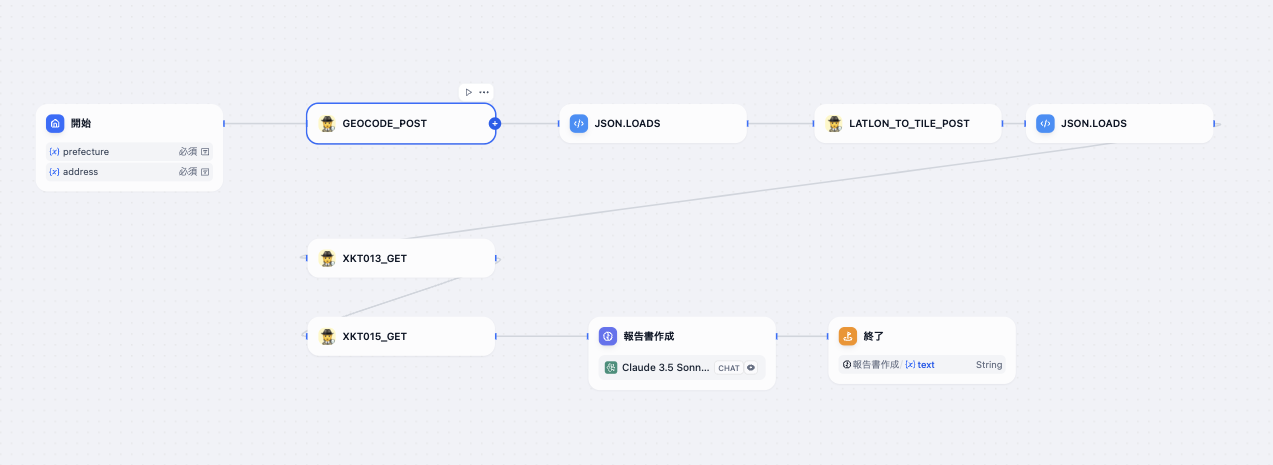
準備したツールを組み合わせて、以下のようなワークフローを構築します。
- 開始ノード: ユーザーから「住所」を入力として受け取る。
- 座標変換ツール: 住所を緯度経度、さらにタイル座標へ変換。
- 不動産APIツール: 座標を元に「将来人口データ」と「駅乗降客数データ」を取得。
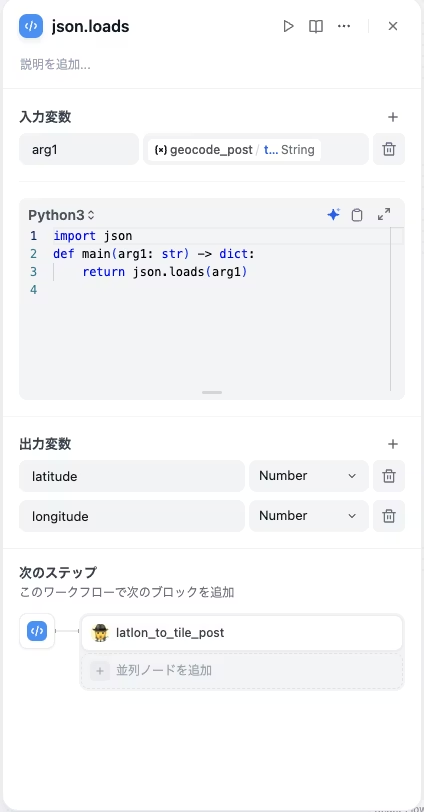
- コードブロック: APIからの生データ(JSON)を、LLMが読みやすい形式に整形。
- LLMノード(分析): データに基づき、専門家のような視点でレポートを作成。
実行結果:AIによるエリア分析レポート
実際に東京都大田区の住所を入力して実行した結果、以下のようなレポートが生成されました。
# 大田区の駅と人口の分析レポート

1. 駅の概要
大田区内には以下の主要な駅が存在します:

大森駅: 1日平均約183,000人の乗降客(区内最大規模)

平和島駅: 1日平均約43,000人の乗降客 ...

2. 将来人口推計の特徴
分析対象エリアの将来人口推計から以下の特徴が見られます:

2020年から2050年にかけて、多くのメッシュで人口減少傾向

特に高齢者人口の増加が顕著 ...

3. 今後の課題と展望
大森駅周辺は現在最も乗降客が多いものの、将来的には人口減少の影響を受ける可能性があります。 駅を中心としたコンパクトなまちづくりと、高齢化に対応した交通環境の整備が求められます。単なる数値の羅列ではなく、「人口減少傾向にある」「高齢化が進む」といったトレンドをAIが言語化してくれています。これは事業計画や不動産投資の判断材料として非常に有用です。
まとめ:Difyで高度なデータ分析をシステム化する
今回の検証で、オープンデータ(不動産情報ライブラリAPI)とDifyを組み合わせることで、専門的な分析業務を自動化できることが実証できました。
「防災情報」や「都市計画情報」など、APIから取得できる他のデータを組み合わせれば、さらに多角的な分析ツールへと進化させることも可能です。ぜひ、自社のビジネスにおける意思決定のシステム化にDifyを活用してみてください。
【参考】不動産情報ライブラリAPIの定義と座標変換の方法
OpenAPIフォーマットでの不動産情報ライブラリAPIの定義
Difyのカスタムツールは、外部APIやサービスをDifyに組み込み、AIエージェントが特定のタスクを実行したり外部データにアクセスしたりするための機能です。
Difyのカスタムツールを活用するためには、不動産情報ライブラリAPIをOpenAPIの仕様で定義する必要があります。
以下に、主要なエンドポイントを例にとってOpenAPI定義の作成方法を説明します。
openapi: 3.0.0
  info:
  title: 不動産情報ライブラリAPI
  version: 1.0.0
  description: | # 不動産情報ライブラリAPI このAPIは、不動産取引価格情報や地価公示・地価調査、国土数値情報等のデータを提供します。
  servers: - url: https://www.reinfolib.mlit.go.jp/ex-api/external
APIの定義
主要なエンドポイントを定義します。
例として、人口統計データと過去の売買情報のエンドポイントを示します:
paths:
/XKT013:
get:
summary: 国土数値情報(将来推計人口500mメッシュ)API
description: 指定された地理的範囲内の将来推計人口(500mメッシュ)情報を取得します。
tags:
- 国土数値情報
parameters:
- name: response_format
in: query
required: true
schema:
type: string
enum: [geojson, pbf]
description: |
応答形式
geojson…GeoJSON応答
pbf…バイナリベクトルタイル応答
- name: z
in: query
required: true
schema:
type: integer
minimum: 11
maximum: 15
description: |
ズームレベル(縮尺)
11(市)~15(詳細)で指定可能
- name: x
in: query
required: true
schema:
type: integer
description: XYZ方式におけるタイル座標のX値
- name: y
in: query
required: true
schema:
type: integer
description: XYZ方式におけるタイル座標のY値
responses:
'200':
description: 成功
content:
application/json:
schema:
type: object
properties:
type:
type: string
description: GeoJSONのタイプ("FeatureCollection")
features:
type: array
items:
type: object
properties:
type:
type: string
description: GeoJSONのタイプ("Feature")
geometry:
type: object
description: 500mメッシュの境界を表すポリゴン
properties:
type:
type: string
enum: ["Polygon"]
coordinates:
type: array
items:
type: array
items:
type: array
items:
type: number
minItems: 2
properties:
type: object
properties:
MESH_ID:
type: string
description: 分割地域メッシュコード
SHICODE:
type: string
description: 行政区域コード
PTN_20XX:
type: integer
description: 20XX年男女計総数人口(秘匿なし)
HITOKU_20XX:
type: string
description: 20XX年秘匿記号
GASSAN_20XX:
type: string
description: 20XX年合算先メッシュ
PT0_20XX:
type: integer
description: 20XX年男女計総数人口
PT1_20XX:
type: integer
description: 20XX年男女計0~4歳人口
PT2_20XX:
type: integer
description: 20XX年男女計5~9歳人口
PT3_20XX:
type: integer
description: 20XX年男女計10~14歳人口
PT4_20XX:
type: integer
description: 20XX年男女計15~19歳人口
PT5_20XX:
type: integer
description: 20XX年男女計20~24歳人口
PT6_20XX:
type: integer
description: 20XX年男女計25~29歳人口
PT7_20XX:
type: integer
description: 20XX年男女計30~34歳人口
PT8_20XX:
type: integer
description: 20XX年男女計35~39歳人口
PT9_20XX:
type: integer
description: 20XX年男女計40~44歳人口
PT10_20XX:
type: integer
description: 20XX年男女計45~49歳人口
PT11_20XX:
type: integer
description: 20XX年男女計50~54歳人口
PT12_20XX:
type: integer
description: 20XX年男女計55~59歳人口
PT13_20XX:
type: integer
description: 20XX年男女計60~64歳人口
PT14_20XX:
type: integer
description: 20XX年男女計65~69歳人口
PT15_20XX:
type: integer
description: 20XX年男女計70~74歳人口
PT16_20XX:
type: integer
description: 20XX年男女計75~79歳人口
PT17_20XX:
type: integer
description: 20XX年男女計80~84歳人口
PT18_20XX:
type: integer
description: 20XX年男女計85~89歳人口
PT19_20XX:
type: integer
description: 20XX年男女計90歳以上人口
PTA_20XX:
type: integer
description: 20XX年男女計0~14歳人口
PTB_20XX:
type: integer
description: 20XX年男女計15~64歳人口
PTC_20XX:
type: integer
description: 20XX年男女計65歳以上人口
PTD_20XX:
type: integer
description: 20XX年男女計75歳以上人口
PTE_20XX:
type: integer
description: 20XX年男女計80歳以上人口
RTA_20XX:
type: number
format: float
description: 20XX年男女計0~14歳人口比率
RTB_20XX:
type: number
format: float
description: 20XX年男女計15~64歳人口比率
RTC_20XX:
type: number
format: float
description: 20XX年男女計65歳以上人口比率
RTD_20XX:
type: number
format: float
description: 20XX年男女計75歳以上人口比率
RTE_20XX:
type: number
format: float
description: 20XX年男女計80歳以上人口比率
application/x-protobuf:
schema:
type: string
format: binary
'400':
description: リクエストパラメータが不正
content:
application/json:
schema:
type: object
properties:
code:
type: integer
message:
type: string
'401':
description: 認証エラー
content:
application/json:
schema:
type: object
properties:
code:
type: integer
message:
type: string
'404':
description: リソースが見つかりません
content:
application/json:
schema:
type: object
properties:
code:
type: integer
message:
type: string
'429':
description: リクエスト回数制限超過
content:
application/json:
schema:
type: object
properties:
code:
type: integer
message:
type: string
security:
- ApiKeyAuth: []
/XKT015:
get:
summary: 国土数値情報(駅別乗降客数)API
description: 指定された地理的範囲内の駅別乗降客数情報を取得します。
tags:
- 国土数値情報
parameters:
- name: response_format
in: query
required: true
schema:
type: string
enum: [geojson, pbf]
description: |
応答形式
geojson…GeoJSON応答
pbf…バイナリベクトルタイル応答
- name: z
in: query
required: true
schema:
type: integer
minimum: 11
maximum: 15
description: |
ズームレベル(縮尺)
11(市)~15(詳細)で指定可能
- name: x
in: query
required: true
schema:
type: integer
description: XYZ方式におけるタイル座標のX値
- name: y
in: query
required: true
schema:
type: integer
description: XYZ方式におけるタイル座標のY値
responses:
'200':
description: 成功
content:
application/json:
schema:
type: object
properties:
type:
type: string
description: GeoJSONのタイプ("FeatureCollection")
features:
type: array
items:
type: object
properties:
type:
type: string
description: GeoJSONのタイプ("Feature")
geometry:
type: object
properties:
type:
type: string
description: ジオメトリタイプ("Point")
coordinates:
type: array
items:
type: number
description: 経度、緯度の順で表される座標
properties:
type: object
properties:
S12_001_ja:
type: string
description: 駅名
S12_001c:
type: string
description: 駅コード
S12_001g:
type: string
description: グループコード
S12_002_ja:
type: string
description: 運営会社
S12_003_ja:
type: string
description: 路線名
S12_004:
type: string
description: 鉄道区分
S12_005:
type: string
description: 事業者種別
S12_006:
type: string
description: 重複コード2011
S12_007:
type: string
description: データ有無コード2011
S12_008:
type: string
description: 備考2011
S12_009:
type: integer
description: 乗降客数2011
S12_010:
type: string
description: 重複コード2012
S12_011:
type: string
description: データ有無コード2012
S12_012:
type: string
description: 備考2012
S12_013:
type: integer
description: 乗降客数2012
S12_014:
type: string
description: 重複コード2013
S12_015:
type: string
description: データ有無コード2013
S12_016:
type: string
description: 備考2013
S12_017:
type: integer
description: 乗降客数2013
S12_018:
type: string
description: 重複コード2014
S12_019:
type: string
description: データ有無コード2014
S12_020:
type: string
description: 備考2014
S12_021:
type: integer
description: 乗降客数2014
S12_022:
type: string
description: 重複コード2015
S12_023:
type: string
description: データ有無コード2015
S12_024:
type: string
description: 備考2015
S12_025:
type: integer
description: 乗降客数2015
S12_026:
type: string
description: 重複コード2016
S12_027:
type: string
description: データ有無コード2016
S12_028:
type: string
description: 備考2016
S12_029:
type: integer
description: 乗降客数2016
S12_030:
type: string
description: 重複コード2017
S12_031:
type: string
description: データ有無コード2017
S12_032:
type: string
description: 備考2017
S12_033:
type: integer
description: 乗降客数2017
S12_034:
type: string
description: 重複コード2018
S12_035:
type: string
description: データ有無コード2018
S12_036:
type: string
description: 備考2018
S12_037:
type: integer
description: 乗降客数2018
S12_038:
type: string
description: 重複コード2019
S12_039:
type: string
description: データ有無コード2019
S12_040:
type: string
description: 備考2019
S12_041:
type: integer
description: 乗降客数2019
S12_042:
type: string
description: 重複コード2020
S12_043:
type: string
description: データ有無コード2020
S12_044:
type: string
description: 備考2020
S12_045:
type: integer
description: 乗降客数2020
S12_046:
type: string
description: 重複コード2021
S12_047:
type: string
description: データ有無コード2021
S12_048:
type: string
description: 備考2021
S12_049:
type: integer
description: 乗降客数2021
S12_050:
type: string
description: 重複コード2022
S12_051:
type: string
description: データ有無コード2022
S12_052:
type: string
description: 備考2022
S12_053:
type: integer
description: 乗降客数2022
application/x-protobuf:
schema:
type: string
format: binary
'400':
description: リクエストパラメータが不正
content:
application/json:
schema:
type: object
properties:
code:
type: integer
message:
type: string
'401':
description: 認証エラー
content:
application/json:
schema:
type: object
properties:
code:
type: integer
message:
type: string
'404':
description: リソースが見つかりません
content:
application/json:
schema:
type: object
properties:
code:
type: integer
message:
type: string
'429':
description: リクエスト回数制限超過
content:
application/json:
schema:
type: object
properties:
code:
type: integer
message:
type: string
security:
- ApiKeyAuth: []この OpenAPI 定義を使用することで、Dify のカスタムツール機能で不動産情報ライブラリ API を簡単に統合できます。API の詳細な仕様や利用可能なすべてのエンドポイントに合わせて、この定義をさらに拡張することができます。
多くのOpenAPIの定義ファイルを人力で作成するのは骨が折れる作業なので、不動産情報ライブラリのAPI操作説明のドキュメントをAnthropicのClaude3.5 Sonnetに与えて作ってもらいました。
他のAPIの定義ファイルも同様にClaude3.5 Sonnetに作ってもらいましょう。
Difyワークフローでの不動産情報ライブラリAPIの統合と座標変換
不動産情報ライブラリAPIを利用するためには、世界測地系とタイル座標系を理解し、それらの間で変換を行う必要があります。
不動産情報ライブラリAPIでは、機能によって世界測地系座標とタイル座標の両方が使用される可能性があります。そのため、これらの座標系間の変換が必要になります。
世界測地系(WGS84)
世界測地系(WGS84)は、地球上の位置を緯度と経度で表す国際的な標準座標系です。
タイル座標系
タイル座標系は、地球の表面を正方形のタイルに分割し、ズームレベル(Z)と X、Y 座標で位置を表現する Web 地図サービスで使用される座標系です。
座標変換の仕組み
- ユーザー入力(住所)→ 世界測地系座標:
- ユーザーが入力した住所を、緯度経度の形式に変換
- Amazon Location Serviceなどのジオコーディングサービスを使用する
- 世界測地系座標 → タイル座標:
- 緯度経度をZ/X/Y形式のタイル座標に変換
- ズームレベルの選択が重要(一般的に13-15が都市レベルの分析に適している)
Amazon Location Serviceを使った住所から世界測地系の座標への変換
住所から世界測地系座標を取得するために、Amazon Location Serviceを利用します。
これをDifyワークフローに組み込むために、AWS Lambda関数を作成し、Amazon API Gatewayで公開した後、Difyのカスタムツールとして設定します。
Lambda関数の作成:
import boto3
import json
import os
import time
import math
from aws_lambda_powertools import Logger

logger = Logger()

def latlon_to_tile(lat, lon, zoom):
    lat_rad = math.radians(lat)
    n = 2.0 ** zoom
    xtile = int((lon + 180.0) / 360.0 * n)
    ytile = int((1.0 - math.asinh(math.tan(lat_rad)) / math.pi) / 2.0 * n)
    return (xtile, ytile, zoom)


def handler(event, context):
    try:
        body = json.loads(event['body'])
        logger.info(body)
        query = body.get('query')
        logger.info(f"query is {query}")

        lat = body['lat']
        lon = body['lon']

        x_13, y_13, z_13 = latlon_to_tile(lat, lon, 13)
        print(f"Tile coordinates: x={x_13}, y={y_13}, z={z_13}")

        x_14, y_14, z_14 = latlon_to_tile(lat, lon, 14)
        print(f"Tile coordinates: x={x_14}, y={y_14}, z={z_14}")

        x_15, y_15, z_15 = latlon_to_tile(lat, lon, 15)
        print(f"Tile coordinates: x={x_15}, y={y_15}, z={z_15}")

        return {'statusCode': 200, 'body': json.dumps(
            {
                "x_13": x_13,
                "y_13": y_13,
                "z_13": z_13,
                "x_14": x_14,
                "y_14": y_14,
                "z_14": z_14,
                "x_15": x_15,
                "y_15": y_15,
                "z_15": z_15,
            })}
    except Exception as e:
        logger.error(str(e))
        return {'statusCode': 500, 'body': json.dumps({'error': str(e)})}


if __name__ == "__main__":
    event = {
        "body": json.dumps({
            "lat": 35.6895,
            "lon": 139.6917
        })
    }
    context = {}
    print(handler(event, context))
Difyでのカスタムツール設定:
Difyの「Tools」セクションで、新しいカスタムツールを追加します。
OpenAPI仕様で、API GatewayのエンドポインドとPOSTメソッドを定義します。
openapi: 3.0.0
info:
  title: Address to Coordinates API
  version: 1.0.0
  description: An API to convert an address to WGS84 coordinates using Amazon Location Service
servers:
- url: "https://abcdefghij.execute-api.ap-northeast-1.amazonaws.com/prod/"

paths:
  /geocode:
    post:
      summary: Convert address to coordinates
      description: Converts a given address to WGS84 coordinates using Amazon Location Service
      requestBody:
        required: true
        content:
          application/json:
            schema:
              type: object
              required:
                - address
              properties:
                address:
                  type: string
                  description: The address to geocode
      responses:
        '200':
          description: Successful conversion
          content:
            application/json:
              schema:
                type: object
                properties:
                  x:
                    type: number
                    format: float
                    description: Longitude (WGS84)
                  y:
                    type: number
                    format: float
                    description: Latitude (WGS84)
        '500':
          description: Internal server error
          content:
            application/json:
              schema:
                type: object
                properties:
                  error:
                    type: string
                    description: Error message
世界測地系の座標からタイル座標への変換
Lambda関数の作成:
import boto3
import json
import os
import time
import math
from aws_lambda_powertools import Logger

logger = Logger()

def latlon_to_tile(lat, lon, zoom):
    lat_rad = math.radians(lat)
    n = 2.0 ** zoom
    xtile = int((lon + 180.0) / 360.0 * n)
    ytile = int((1.0 - math.asinh(math.tan(lat_rad)) / math.pi) / 2.0 * n)
    return (xtile, ytile, zoom)


def handler(event, context):
    try:
        body = json.loads(event['body'])
        logger.info(body)
        query = body.get('query')
        logger.info(f"query is {query}")

        lat = body['lat']
        lon = body['lon']

        x_13, y_13, z_13 = latlon_to_tile(lat, lon, 13)
        print(f"Tile coordinates: x={x_13}, y={y_13}, z={z_13}")

        x_14, y_14, z_14 = latlon_to_tile(lat, lon, 14)
        print(f"Tile coordinates: x={x_14}, y={y_14}, z={z_14}")

        x_15, y_15, z_15 = latlon_to_tile(lat, lon, 15)
        print(f"Tile coordinates: x={x_15}, y={y_15}, z={z_15}")

        return {'statusCode': 200, 'body': json.dumps(
            {
                "x_13": x_13,
                "y_13": y_13,
                "z_13": z_13,
                "x_14": x_14,
                "y_14": y_14,
                "z_14": z_14,
                "x_15": x_15,
                "y_15": y_15,
                "z_15": z_15,
            })}
    except Exception as e:
        logger.error(str(e))
        return {'statusCode': 500, 'body': json.dumps({'error': str(e)})}


if __name__ == "__main__":
    event = {
        "body": json.dumps({
            "lat": 35.6895,
            "lon": 139.6917
        })
    }
    context = {}
    print(handler(event, context))
Difyでのカスタムツール設定:
Difyの「Tools」セクションで、新しいカスタムツールを追加します。
OpenAPI仕様で、API GatewayのエンドポインドとPOSTメソッドを定義します。
openapi: 3.0.0
info:
  title: Tile Coordinate Converter API
  version: 1.0.0
  description: An API to convert latitude and longitude to tile coordinates

servers:
- url: "https://abcdefghij.execute-api.ap-northeast-1.amazonaws.com/prod/"

paths:
  /latlon_to_tile:
    post:
      summary: Convert lat/lon to tile coordinates
      description: Converts given latitude and longitude to tile coordinates at zoom level 15
      requestBody:
        required: true
        content:
          application/json:
            schema:
              type: object
              required:
                - lat
                - lon
              properties:
                lat:
                  type: number
                  format: float
                  description: Latitude
                lon:
                  type: number
                  format: float
                  description: Longitude
      responses:
        '200':
          description: Successful conversion
          content:
            application/json:
              schema:
                type: object
                properties:
                  x_13:
                    type: integer
                  y_13:
                    type: integer
                  z_13:
                    type: integer
                  x_14:
                    type: integer
                  y_14:
                    type: integer
                  z_14:
                    type: integer
                  x_15:
                    type: integer
                  y_15:
                    type: integer
                  z_15:
                    type: integer
        '500':
          description: Internal server error
          content:
            application/json:
              schema:
                type: object
                properties:
                  error:
                    type: string
【推奨】業務システム化に有効なアイテム
生成AIを学ぶ



システム化のパートナー(ミラーマスター合同会社)




VPSサーバの選定



コメント