
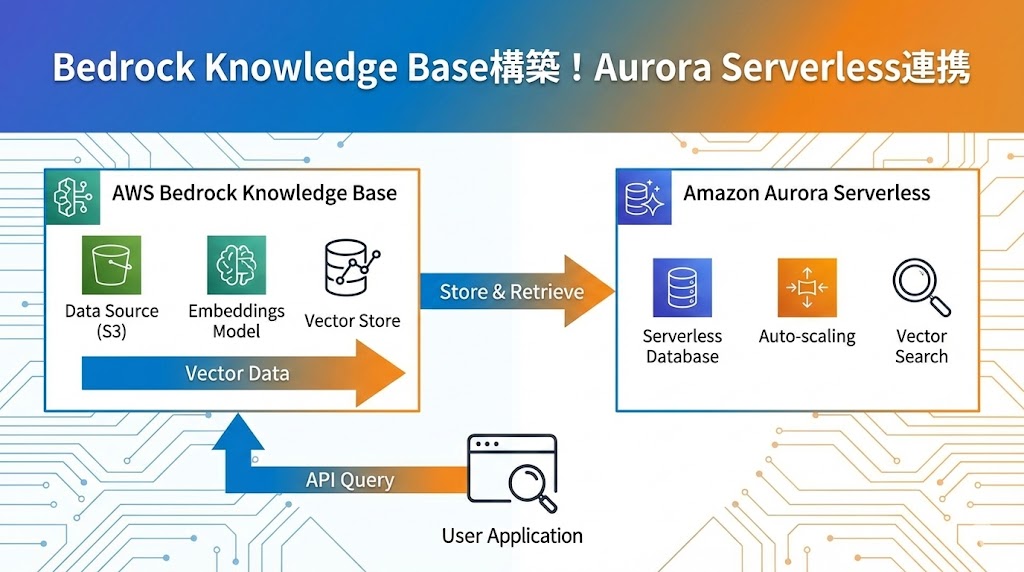
生成AIに社内独自の知識を持たせる「RAG(検索拡張生成)」の構築において、Amazon Bedrock Knowledge Baseは非常に強力なツールです。
この記事では、データソースとしてAmazon S3、ベクトルデータベースとしてAurora Serverless v2 (PostgreSQL)を採用したKnowledge Base環境を、CloudFormationを使って一撃で構築する手順を解説します。
構成の概要
今回構築するアーキテクチャは以下の通りです。
- データソース: Amazon S3(ドキュメントファイルを格納)
- ベクトルデータベース: Aurora Serverless v2 (pgvector拡張機能を有効化したPostgreSQL)
- ナレッジベース: Amazon Bedrock Knowledge Base
Aurora Serverlessを採用する理由
Aurora Serverlessは、AWSが提供するフルマネージド型のリレーショナルデータベースです。特にv2では、ワークロードに応じて瞬時に容量を自動スケーリングするため、RAGのようにアクセス頻度が変動しやすいシステムに最適です。
また、VPCエンドポイント経由でのプライベート接続となるため、セキュリティ要件の高い企業システムでも安心して利用できます。
Aurora Serverlessとは、AWS(Amazon Web Services)が提供するフルマネージド型のデータベースサービスです。
フルマネージドサービスとは、ITインフラに関わる運用や保守などをアウトソーシングできるというものです。 サーバーやネットワークの運用管理から、障害発生時の対応・セキュリティ対策・機器のメンテナンスまですべてを任せることができます。
Aurora Serverlessは、AuroraというAWSが独自開発したデータベースエンジンを搭載しており、AuroraにはAmazon AuroraとAurora Serverlessが存在します。
Aurora Serverlessは、VPCエンドポイントを経由します。VPCエンドポイントとは、VPC内のインスタンスがインターネットを経由せずに、AWSのサービスやオンプレミス環境に安全に接続できるようにする機能です。Aurora Serverlessはプライベート接続を使用するため、安全性が高い分、少々回り道をする通信経路になっています。
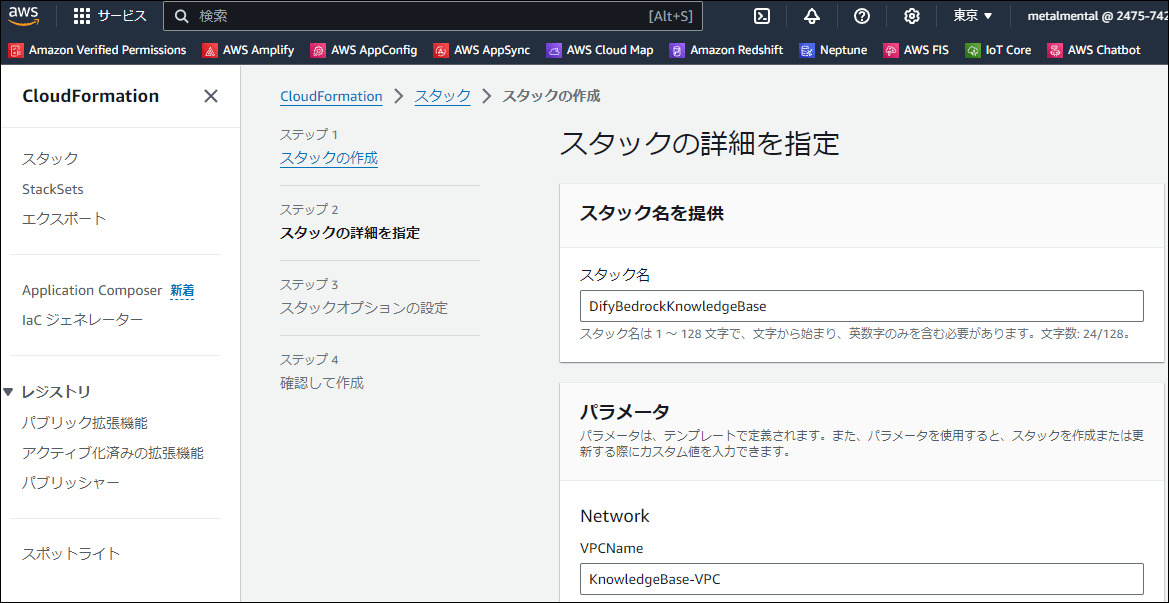
CloudFormationテンプレートによる自動構築
以下のテンプレートを使用することで、VPC、Auroraクラスター、S3バケット、IAMロール、そしてBedrock Knowledge Baseまでを一括で作成できます。 クリックしてCloudFormationテンプレート(YAML)を表示
Metadata:
  AWS::CloudFormation::Interface:
    ParameterGroups:
      - Label:
          default: Network
        Parameters:
          - VPCName
          - PrivateSubnetName1A
          - PrivateSubnetName1C
          - PrivateSubnetRegion1A
          - PrivateSubnetRegion1C
          - PrivateSubnetRouteTableName
      - Label:
          default: Aurora
        Parameters:
          - AuroraSecurityGroupName
          - AuroraSubnetGroupName
          - AuroraName
          - DBUserName
      - Label:
          default: SecretsManager
        Parameters:
          - SecretsManagerName
          - DBBedrockUser
          - DBBedrockPassword
      - Label:
          default: S3
        Parameters:
          - S3Name
          - S3LambdaName
          - S3IAMRoleName
          - S3IAMPolicyName
          - S3CloudWatchLogsName
      - Label:
          default: Lambda
        Parameters:
          - ExecSQLLambdaRoleName
          - ExecSQLLambdaeName
      - Label:
          default: KnowledgeBase
        Parameters:
          - KnowledgeBaseIAMRoleName
          - KnowledgeBaseIAMPolicyName
          - KnowledgeBaseName
          - KnowledgeBaseEmbeddingModel
          - KnowledgeBaseDataSourceName

Parameters:
  VPCName:
    Type: String
    Default: "KnowledgeBase-VPC"
  PrivateSubnetName1A:
    Type: String
    Default: "KnowledgeBase-PrivateSubnet1A"
  PrivateSubnetName1C:
    Type: String
    Default: "KnowledgeBase-PrivateSubnet1C"
  PrivateSubnetRegion1A:
    Type: String
    Default: "ap-northeast-1a"
  PrivateSubnetRegion1C:
    Type: String
    Default: "ap-northeast-1c"
  PrivateSubnetRouteTableName:
    Type: String
    Default: "KnowledgeBase-PrivateSubnetRouteTable"

  AuroraSubnetGroupName:
    Type: String
    Default: "KnowledgeBase-AuroraSubnetGroup"
  AuroraSecurityGroupName:
    Type: String
    Default: "KnowledgeBase-AuroraSecurityGroup"
  AuroraName:
    Type: String
    Default: "knowledgebase"
  DBUserName:
    Type: String
    Default: "postgresql"

  SecretsManagerName:
    Type: String
    Default: "knowledge-base"
  DBBedrockUser:
    Type: String
    Default: "bedrock_user"
  DBBedrockPassword:
    Type: String
    Default: "bedrock_password"

  S3Name:
    Type: String
    Default: "knowledgebase-datasource"
  S3LambdaName:
    Type: String
    Default: "delete-knowledgebase-datasource"
  S3IAMRoleName:
    Type: String
    Default: "delete-knowledgebase-datasource"
  S3IAMPolicyName:
    Type: String
    Default: "delete-knowledgebase-datasource"
  S3CloudWatchLogsName:
    Type: String
    Default: "delete-knowledgebase-datasource"

  ExecSQLLambdaRoleName:
    Type: String
    Default: "KnowledgeBase-ExecSQLLambda-Role"
  ExecSQLLambdaeName:
    Type: String
    Default: "KnowledgeBase-ExecSQLLambda"

  KnowledgeBaseIAMRoleName:
    Type: String
    Default: "KnowledgeBase-IAMRole"
  KnowledgeBaseIAMPolicyName:
    Type: String
    Default: "KnowledgeBase-IAMPolicy"
  KnowledgeBaseName:
    Type: String
    Default: "KnowledgeBase"
  KnowledgeBaseEmbeddingModel:
    Type: String
    Default: "amazon.titan-embed-text-v1"
  KnowledgeBaseDataSourceName:
    Type: String
    Default: "KnowledgeBaseDataSource"

Resources:
  VPC:
    Type: "AWS::EC2::VPC"
    Properties:
      CidrBlock: "10.0.0.0/16"
      EnableDnsSupport: true
      EnableDnsHostnames: true
      Tags:
        - Key: "Name"
          Value: !Ref VPCName
  PrivateSubnet1A:
    Type: "AWS::EC2::Subnet"
    Properties:
      VpcId: !Ref VPC
      CidrBlock: "10.0.1.0/24"
      AvailabilityZone: !Ref PrivateSubnetRegion1A
      MapPublicIpOnLaunch: false
      Tags:
        - Key: "Name"
          Value: !Ref PrivateSubnetName1A
  PrivateSubnet1C:
    Type: "AWS::EC2::Subnet"
    Properties:
      VpcId: !Ref VPC
      CidrBlock: "10.0.2.0/24"
      AvailabilityZone: !Ref PrivateSubnetRegion1C
      MapPublicIpOnLaunch: false
      Tags:
        - Key: "Name"
          Value: !Ref PrivateSubnetName1C
  PrivateSubnetRouteTable:
    Type: "AWS::EC2::RouteTable"
    Properties:
      VpcId: !Ref VPC
      Tags:
        - Key: "Name"
          Value: !Ref PrivateSubnetRouteTableName
  PrivateSubnetRouteTableAssociation1A:
    Type: "AWS::EC2::SubnetRouteTableAssociation"
    Properties:
      SubnetId: !Ref PrivateSubnet1A
      RouteTableId: !Ref PrivateSubnetRouteTable
  PrivateSubnetRouteTableAssociation1C:
    Type: "AWS::EC2::SubnetRouteTableAssociation"
    Properties:
      SubnetId: !Ref PrivateSubnet1C
      RouteTableId: !Ref PrivateSubnetRouteTable

  DBSecurityGroup:
    Type: AWS::EC2::SecurityGroup
    Properties:
      GroupName: !Ref AuroraSecurityGroupName
      GroupDescription: Allow all traffic from self
      VpcId: !GetAtt VPC.VpcId
  DBSubnetGroup:
    Type: "AWS::RDS::DBSubnetGroup"
    Properties:
      DBSubnetGroupName: !Ref AuroraSubnetGroupName
      DBSubnetGroupDescription: Bedrock Aurora Subnet Group # required description
      SubnetIds:
        - !GetAtt PrivateSubnet1A.SubnetId
        - !GetAtt PrivateSubnet1C.SubnetId
  AuroraCluster:
    Type: "AWS::RDS::DBCluster"
    DeletionPolicy: Delete
    Properties:
      Engine: "aurora-postgresql"
      EngineVersion: "15.6" # https://docs.aws.amazon.com/ja_jp/AmazonRDS/latest/AuroraUserGuide/aurora-serverless-v2.requirements.html#aurora-serverless-v2-Availability
      DBClusterIdentifier: "aurora-cluster"
      DatabaseName: !Ref AuroraName
      MasterUsername: !Ref DBUserName
      ManageMasterUserPassword: true
      StorageType: "aurora"
      ServerlessV2ScalingConfiguration:
        MinCapacity: 0.5
        MaxCapacity: 1.0
      VpcSecurityGroupIds:
        - !GetAtt DBSecurityGroup.GroupId
      DBSubnetGroupName: !Ref DBSubnetGroup
      AvailabilityZones:
        - !Ref PrivateSubnetRegion1A
        - !Ref PrivateSubnetRegion1C
      BackupRetentionPeriod: "7"
      DeletionProtection: False
      StorageEncrypted: False
      EnableHttpEndpoint: true # boto3.client('rds-data') を使用する際に必要
  AuroraInstance:
    Type: "AWS::RDS::DBInstance"
    Properties:
      Engine: "aurora-postgresql"
      DBClusterIdentifier: !Ref AuroraCluster
      DBInstanceIdentifier: "aurora-instance"
      DBInstanceClass: "db.serverless"
      PubliclyAccessible: False
      EnablePerformanceInsights: False
      MonitoringInterval: "0"

  SecretsManager:
    Type: AWS::SecretsManager::Secret
    Properties:
      Name: !Ref SecretsManagerName
      Description: "Secret for the database user for Bedrock"
      SecretString: !Sub '{ "username":"${DBBedrockUser}", "password":"${DBBedrockPassword}"}'

  S3:
    Type: AWS::S3::Bucket
    Properties:
      BucketName: !Sub "${S3Name}-${AWS::AccountId}"
      BucketEncryption:
        ServerSideEncryptionConfiguration:
          - BucketKeyEnabled: FALSE
      VersioningConfiguration:
        Status: "Suspended"
      LifecycleConfiguration:
        Rules:
          - Id: "rule1"
            NoncurrentVersionExpiration:
              NoncurrentDays: 1
            Status: "Enabled"
      CorsConfiguration:
        CorsRules:
          - Id: corsRule1
            MaxAge: 0
            AllowedHeaders:
              - "*"
            AllowedMethods:
              - PUT
              - POST
            AllowedOrigins:
              - "https://www.metalmental.net"
  S3Lambda:
    Type: AWS::Lambda::Function
    Properties:
      FunctionName: !Ref S3LambdaName
      Handler: index.lambda_handler
      Role: !GetAtt S3IAMRole.Arn
      Runtime: python3.12
      Timeout: 300
      LoggingConfig:
        LogGroup: !Ref S3CloudWatchLogs
      Code:
        ZipFile: |
          import boto3
          import cfnresponse
          def lambda_handler(event, context):
              s3 = boto3.resource('s3')
              try:
                  if event['RequestType'] == 'Delete':
                      bucket = s3.Bucket(event['ResourceProperties']['BucketName'])
                      bucket.objects.all().delete()
                      bucket.object_versions.all().delete()
                      s3.Bucket(event['ResourceProperties']['BucketName']).delete()
                  cfnresponse.send(event, context, cfnresponse.SUCCESS, {})
              except Exception as e:
                  print("Error: ", e)
                  cfnresponse.send(event, context, cfnresponse.FAILED, {})
  S3LambdaInvoke:
    Type: Custom::EmptyS3Bucket
    Properties:
      ServiceToken: !GetAtt S3Lambda.Arn
      BucketName: !Ref S3
  S3IAMRole:
    Type: AWS::IAM::Role
    Properties:
      RoleName: !Ref S3IAMRoleName
      AssumeRolePolicyDocument:
        Version: "2012-10-17"
        Statement:
          - Effect: Allow
            Principal:
              Service: lambda.amazonaws.com
            Action: sts:AssumeRole
      ManagedPolicyArns:
        - "arn:aws:iam::aws:policy/AmazonRDSDataFullAccess"
      Policies:
        - PolicyName: !Ref S3IAMPolicyName
          PolicyDocument:
            Version: "2012-10-17"
            Statement:
              - Effect: Allow
                Action:
                  - s3:*
                Resource:
                  - !Sub ${S3.Arn}
                  - !Sub ${S3.Arn}/*
              - Effect: Allow
                Action:
                  - logs:*
                Resource:
                  - !Sub ${S3CloudWatchLogs.Arn}
              - Effect: Allow
                Action:
                  - secretsmanager:GetSecretValue
                Resource:
                  - !Sub ${AuroraCluster.MasterUserSecret.SecretArn}
  S3CloudWatchLogs:
    Type: AWS::Logs::LogGroup
    Properties:
      LogGroupName: !Ref S3CloudWatchLogsName
      RetentionInDays: 1

  SetupAuroraData:
    Type: "Custom::SetupAuroraData"
    DependsOn: AuroraInstance
    Properties:
      ServiceToken: !GetAtt ExecSQLLambda.Arn
      ClusterArn: !GetAtt AuroraCluster.DBClusterArn
      SecretArn: !GetAtt AuroraCluster.MasterUserSecret.SecretArn
      DatabaseName: !Ref AuroraName
      DatabasePassword: !Ref DBBedrockPassword
      UserName: !Ref DBBedrockUser
  ExecSQLLambda:
    Type: AWS::Lambda::Function
    Properties:
      FunctionName: !Ref ExecSQLLambdaeName
      Handler: index.lambda_handler
      Role: !GetAtt S3IAMRole.Arn
      Runtime: python3.12
      Timeout: 900
      LoggingConfig:
        LogGroup: !Ref S3CloudWatchLogs
      Code:
        ZipFile: |
          import boto3
          import cfnresponse

          rds_data = boto3.client('rds-data')

          def execute_statement(cluster_arn, database_name, secret_arn, sql):
              response = rds_data.execute_statement(
                  resourceArn=cluster_arn,
                  database=database_name,
                  secretArn=secret_arn,
                  sql=sql
              )
              return response

          def lambda_handler(event, context):
              try:
                  cluster_arn = event['ResourceProperties']['ClusterArn']
                  secret_arn = event['ResourceProperties']['SecretArn']
                  database_name = event['ResourceProperties']['DatabaseName']
                  database_password = event['ResourceProperties']['DatabasePassword']
                  user_name = event['ResourceProperties']['UserName']
                  print(f"cluster_arn: {cluster_arn}")
                  print(f"secret_arn: {secret_arn}")
                  print(f"database_name: {database_name}")
                  print(f"database_password: {database_password}")
                  print(f"user_name: {user_name}")

                  if event['RequestType'] == 'Create':
                      print("Setup Aurora")
                      # https://docs.aws.amazon.com/ja_jp/AmazonRDS/latest/AuroraUserGuide/AuroraPostgreSQL.VectorDB.html#AuroraPostgreSQL.VectorDB.PreparingKB
                      # 4
                      create_extension = f"CREATE EXTENSION IF NOT EXISTS vector;"
                      execute_statement(cluster_arn, database_name, secret_arn, create_extension)

                      check_pg_vector = f"SELECT extversion FROM pg_extension WHERE extname='vector';"
                      execute_statement(cluster_arn, database_name, secret_arn, check_pg_vector)

                      # 5
                      create_schema = f"CREATE SCHEMA bedrock_integration;"
                      execute_statement(cluster_arn, database_name, secret_arn, create_schema)

                      # 6
                      create_role = f"CREATE ROLE {user_name} WITH PASSWORD '{database_password}' LOGIN;"
                      execute_statement(cluster_arn, database_name, secret_arn, create_role)

                      # 7
                      grant_schema = f"GRANT ALL ON SCHEMA bedrock_integration to {user_name};"
                      execute_statement(cluster_arn, database_name, secret_arn, grant_schema)

                      # 8
                      create_table = f"CREATE TABLE bedrock_integration.bedrock_kb (id uuid PRIMARY KEY, embedding vector(1536), chunks text, metadata json)"
                      execute_statement(cluster_arn, database_name, secret_arn, create_table)

                      # require
                      grant_table = f"GRANT ALL ON TABLE bedrock_integration.bedrock_kb TO {user_name};"
                      execute_statement(cluster_arn, database_name, secret_arn, grant_table)

                      # 9
                      create_index = f"CREATE INDEX on bedrock_integration.bedrock_kb USING hnsw (embedding vector_cosine_ops);"
                      execute_statement(cluster_arn, database_name, secret_arn, create_index)

                  cfnresponse.send(event, context, cfnresponse.SUCCESS, {})
              except Exception as e:
                  cfnresponse.send(event, context, cfnresponse.FAILED, {'Message': str(e)})

  KnowledgeBaseIAMRole:
    Type: AWS::IAM::Role
    Properties:
      RoleName: !Ref KnowledgeBaseIAMRoleName
      AssumeRolePolicyDocument:
        Version: "2012-10-17"
        Statement:
          - Effect: Allow
            Action:
              - "sts:AssumeRole"
            Principal:
              Service:
                - bedrock.amazonaws.com
      ManagedPolicyArns:
        - "arn:aws:iam::aws:policy/AmazonRDSDataFullAccess"
      Policies:
        - PolicyName: !Ref KnowledgeBaseIAMPolicyName
          PolicyDocument:
            Version: "2012-10-17"
            Statement:
              - Effect: Allow
                Action:
                  - "bedrock:InvokeModel"
                Resource:
                  - "*"
              - Effect: Allow
                Action:
                  - s3:*
                Resource:
                  - !Sub ${S3.Arn}
                  - !Sub ${S3.Arn}/*
              - Effect: Allow
                Action:
                  - secretsmanager:GetSecretValue
                Resource:
                  - !Ref SecretsManager
              - Effect: Allow
                Action:
                  - rds:*
                Resource:
                  - !Sub ${AuroraCluster.DBClusterArn}
  BedrockKnowledgeBase:
    Type: AWS::Bedrock::KnowledgeBase
    Properties:
      Name: !Ref KnowledgeBaseName
      RoleArn: !GetAtt KnowledgeBaseIAMRole.Arn
      KnowledgeBaseConfiguration:
        Type: VECTOR
        VectorKnowledgeBaseConfiguration:
          EmbeddingModelArn: !Sub
            - "arn:${AWS::Partition}:bedrock:${AWS::Region}::foundation-model/${Model}"
            - Model: !Ref KnowledgeBaseEmbeddingModel
      StorageConfiguration:
        Type: RDS
        RdsConfiguration:
          CredentialsSecretArn: !Ref SecretsManager
          DatabaseName: !Ref AuroraName
          FieldMapping:
            PrimaryKeyField: "id"
            VectorField: "embedding"
            TextField: "chunks"
            MetadataField: "metadata"
          ResourceArn: !GetAtt AuroraCluster.DBClusterArn
          TableName: "bedrock_integration.bedrock_kb"
    DependsOn: SetupAuroraData
  KnowledgeBaseDataSource:
    Type: AWS::Bedrock::DataSource
    Properties:
      KnowledgeBaseId: !Ref BedrockKnowledgeBase
      Name: !Ref KnowledgeBaseDataSourceName
      DataSourceConfiguration:
        Type: S3
        S3Configuration:
          BucketArn: !GetAtt S3.Arn
データの投入と同期(Sync)
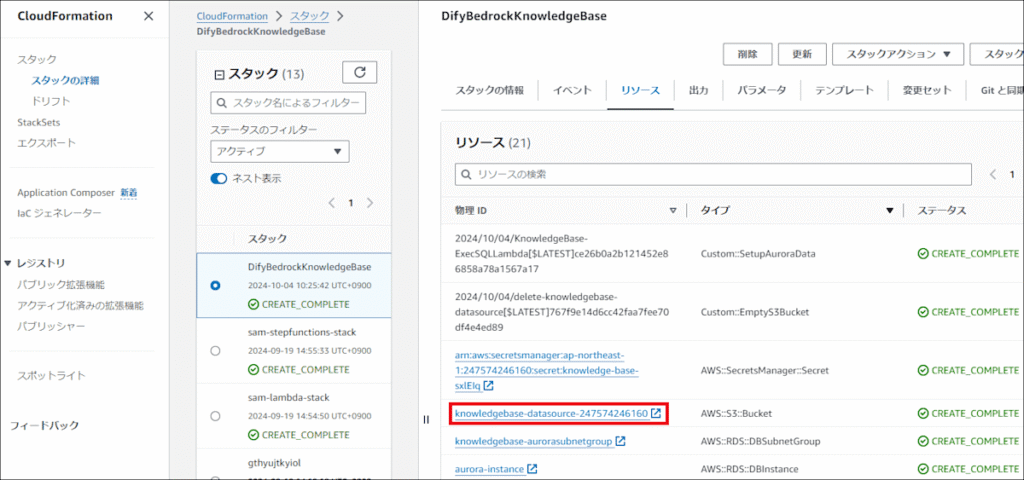
スタック作成が完了したら、実際にナレッジとして利用したいデータを投入し、Knowledge Baseと同期させます。
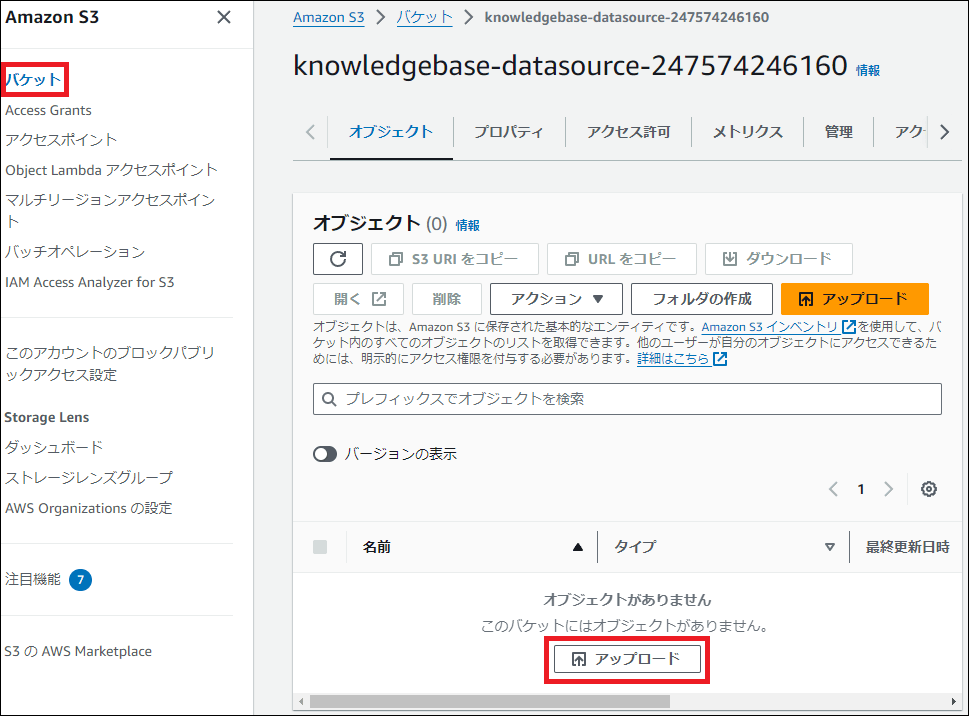
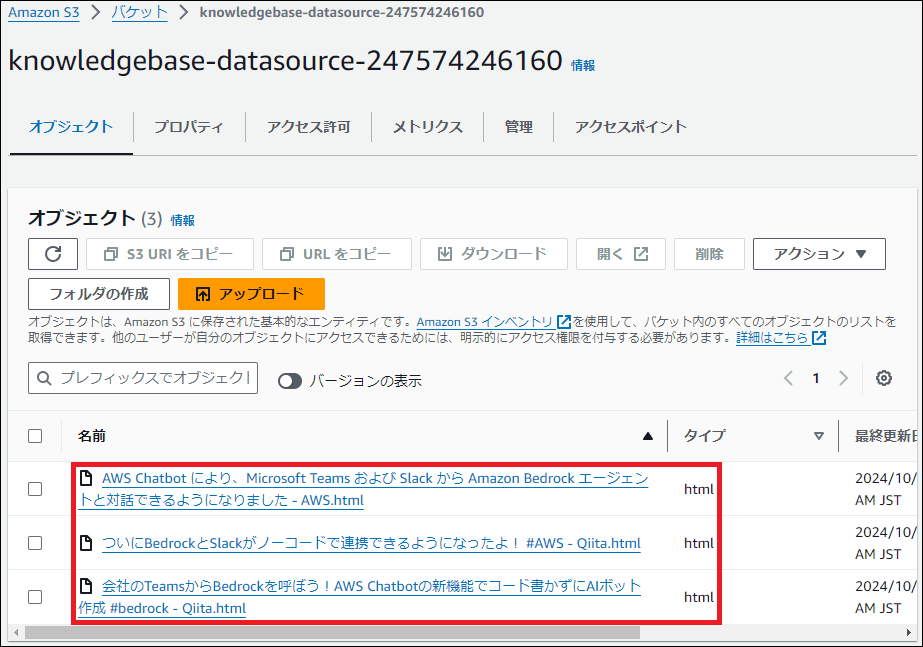
1. S3へのファイルアップロード
作成されたS3バケットに、AIに学習させたいファイルをアップロードします。今回は例として、AWS ChatbotとBedrockの連携に関する最新のブログ記事(HTMLファイル)を3つ格納しました。
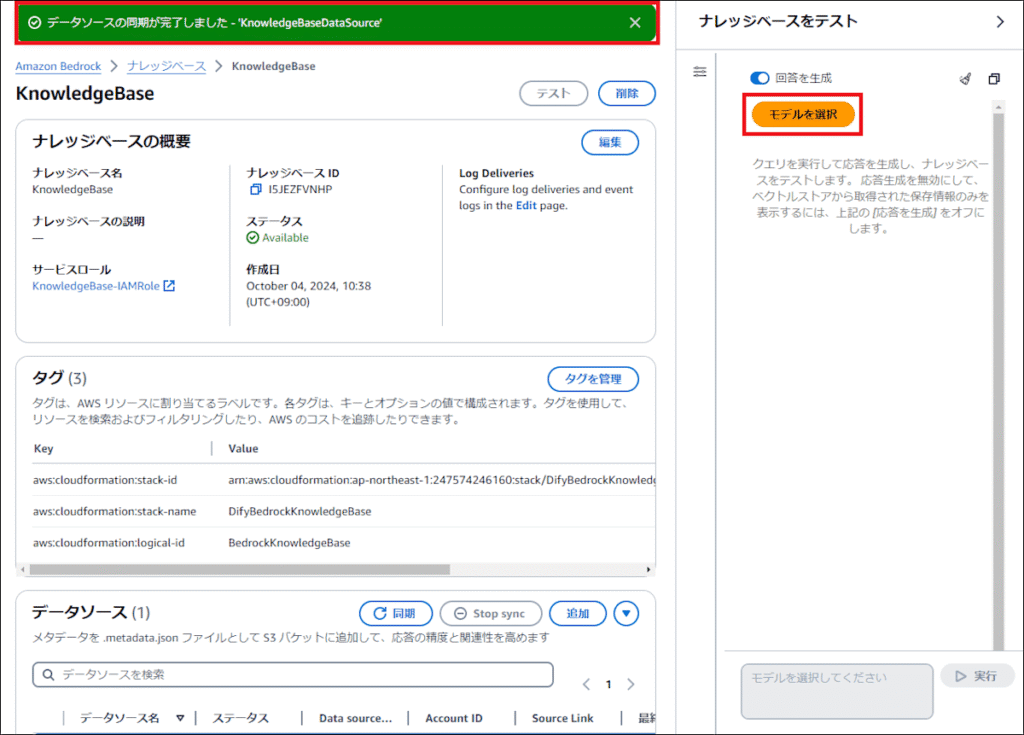
2. データソースの同期(Sync)
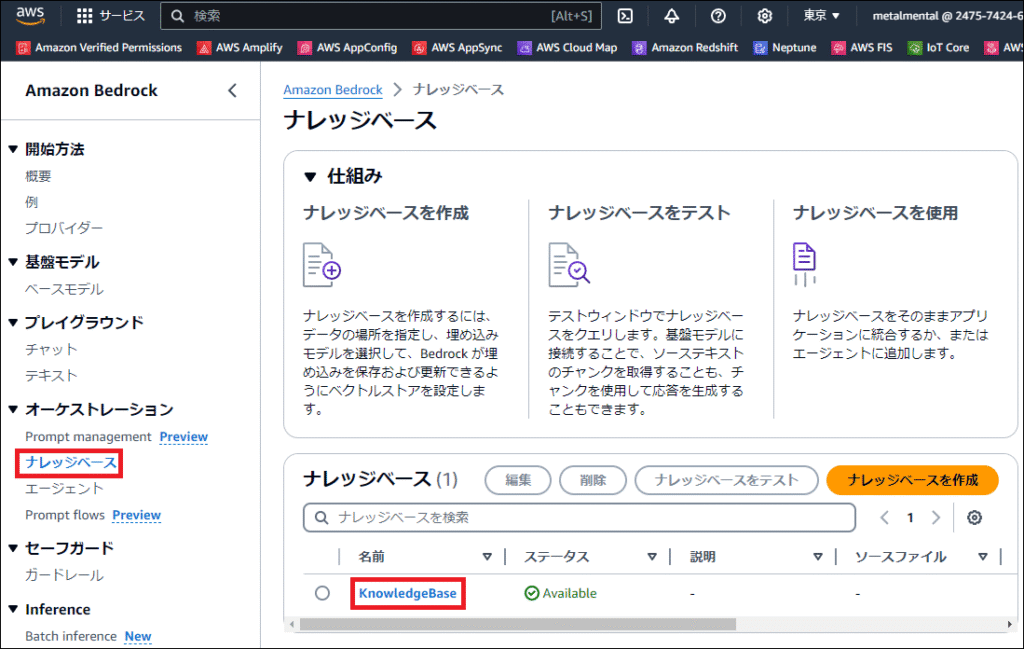
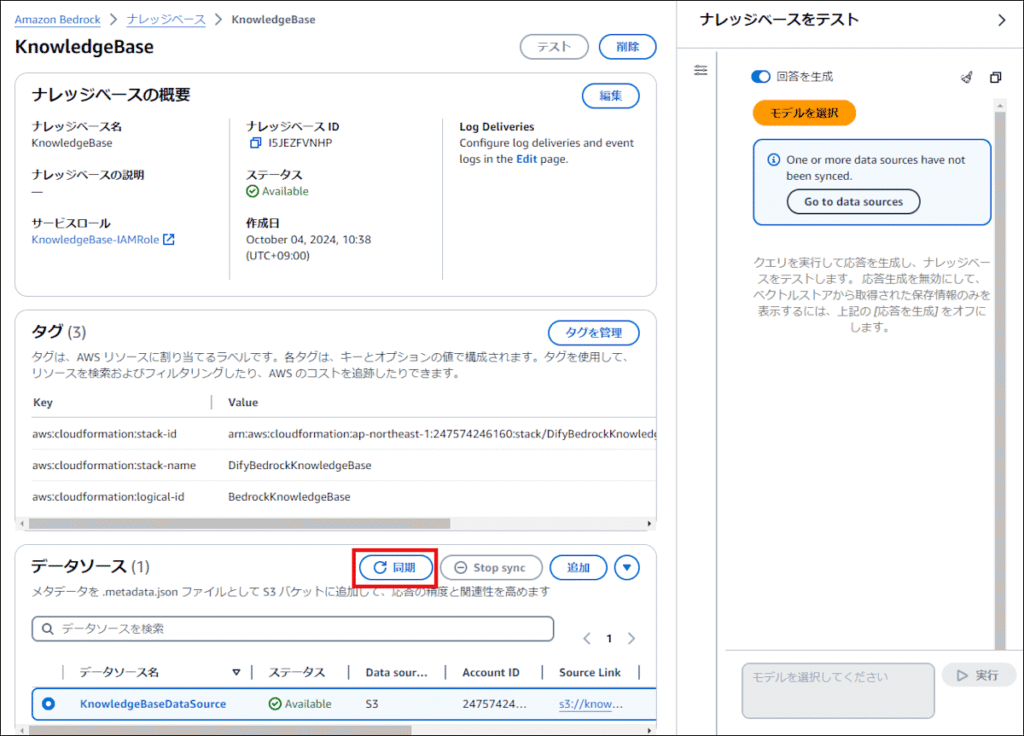
Bedrockのコンソールから、Knowledge Baseを選択し、データソースの「Sync(同期)」ボタンをクリックします。これにより、S3内のファイルが読み込まれ、エンベディング(ベクトル化)されてAurora Serverlessに保存されます。
動作テスト
同期が完了したら、Bedrockのコンソール上でテストを行います。「bedrock と teams は連携できますか」といった、アップロードした記事の内容に関する質問を投げてみます。
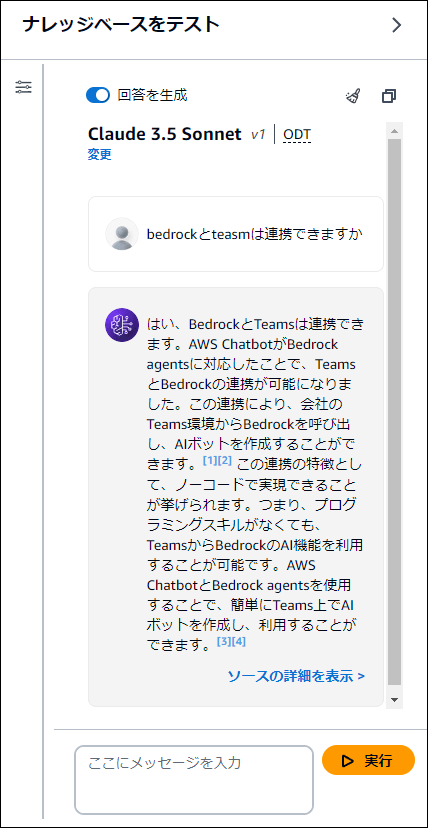
Knowledge Baseが正しく機能し、S3内の情報を元に回答が生成されていることが確認できました。
まとめ
CloudFormationを活用することで、複雑なVPCやデータベースの設定を含むRAG環境を短時間で構築することが可能です。
特にAurora Serverless v2は、スケーラビリティとコスト効率のバランスが良く、本格的なナレッジベース運用において非常に有力な選択肢となります。ぜひこのテンプレートを活用して、自社専用の生成AI環境を構築してみてください。
コメント