

「ChatGPTのAPIコストを気にせず、LINEでAIと会話したい」
「社内秘のデータを扱うため、ローカル環境で完結するAIボットを作りたい」
そんなニーズに応えるのが、Dify(ローカル版)とローカルLLMを組み合わせたLINE Botの開発です。
今回は、Flaskサーバーを仲介役として、LINE、Dify、そしてローカルLLM(Open WebUI等)を連携させるシステム構築の手順を解説します。
システムの全体像と構成
今回構築するLINE Botシステムは、以下の3つの主要コンポーネントで構成されます。
- Flaskウェブサーバー(仲介役):LINEとDifyの間の通信を変換・中継します。
- Dify(AI基盤):高度なワークフロー制御やプロンプト管理を行います。
- ローカルLLMサーバー:実際の文章生成や画像認識を行うAIモデル(Llama 3.2など)が稼働します。
通信の流れは以下の通りです。
graph TD A[LINEアプリ] -- メッセージ送信 --> B[Flaskサーバー] B -- メッセージ加工 --> C[Dify API] C -- 推論リクエスト --> D[ローカルLLMサーバー] D -- 推論結果 --> C C -- 回答生成 --> B B -- LINE形式に変換 --> A
Flaskサーバーの実装(LINE⇔Difyのブリッジ)
LINE BotのWebhookを受け取り、DifyのAPI仕様に合わせてリクエストを投げるFlaskサーバーをPythonで構築します。
このサーバーの主な役割は以下の通りです。
- LINEからのコールバック受信と署名検証
- ユーザーメッセージの抽出と加工(過去の会話履歴の付与など)
- メッセージ内容に応じたDifyワークフローの使い分け(テキスト、検索、画像)
- Difyからの応答をLINEメッセージ形式に変換して返信
以下は、実際に稼働させているサーバーコードの主要部分です。
※以下のコードの場合、Difyのワークフローは「会話用」「ネット検索用」「画像へのリアクション生成」の3つがあるため、それぞれに応じてどのワークフローにユーザーのメッセージを投じるかを分岐している
import os
import json
import subprocess
import requests
from flask import Flask, request, abort, send_from_directory
from linebot.v3.messaging import Configuration, ApiClient, MessagingApi, ReplyMessageRequest, TextMessage
from linebot.v3 import WebhookHandler
from linebot.v3.webhooks import MessageEvent, TextMessageContent, ImageMessageContent
from linebot.v3.exceptions import InvalidSignatureError

# Flaskアプリケーションの初期化
app = Flask(__name__)

# 設定ファイルの読み込み
CONFIG_FILE = "config.json"
if not os.path.exists(CONFIG_FILE):
    raise FileNotFoundError(f"設定ファイルが見つかりません: {CONFIG_FILE}")
with open(CONFIG_FILE, "r") as file:
    config = json.load(file)

# LINE BotとAPIの設定
configuration = Configuration(access_token=config["LINE_CHANNEL_ACCESS_TOKEN"])
handler = WebhookHandler(config["LINE_CHANNEL_SECRET"])

# 定数の設定
IMAGE_SAVE_DIRECTORY = config["IMAGE_SAVE_DIRECTORY"]
os.makedirs(IMAGE_SAVE_DIRECTORY, exist_ok=True)
DIFY_API_KEYS = {
    "text": config["DIFY_API_KEY_TEXT"],
    "image": config["DIFY_API_KEY_IMAGE"],
    "search": config["DIFY_API_KEY_SEARCH"],
}
DIFY_BASE_URL = config["DIFY_BASE_URL"]
DIFY_PROMPT = config["DIFY_PROMPT"]
MAX_CONTEXT_LENGTH = config.get("MAX_CONTEXT_LENGTH", 20)

# チャット履歴の初期化
chat_history = {}

# 各種ユーティリティ関数
def get_chat_key(event):
    """チャットごとに一意のキーを生成"""
    if hasattr(event.source, 'group_id'):
        return f"group-{event.source.group_id}"
    elif hasattr(event.source, 'user_id'):
        return f"user-{event.source.user_id}"
    return "unknown"

def update_chat_history(chat_key, message):
    """チャット履歴を更新"""
    if chat_key not in chat_history:
        chat_history[chat_key] = []
    if len(chat_history[chat_key]) >= MAX_CONTEXT_LENGTH:
        chat_history[chat_key].pop(0)
    chat_history[chat_key].append(message)

def restart_open_webui(reply_token):
    """open-webuiコンテナを再起動"""
    try:
        subprocess.run(["docker", "restart", "open-webui"], check=True)
        app.logger.info("open-webuiコンテナが正常に再起動されました。")
        send_line_reply(reply_token, "ごめん寝てた。何?")
    except subprocess.CalledProcessError as e:
        app.logger.error(f"open-webuiの再起動に失敗しました: {e}")

def get_group_member_display_name(group_id, user_id):
    """グループメンバーのプロフィール情報から表示名を取得"""
    with ApiClient(configuration) as api_client:
        messaging_api = MessagingApi(api_client)
        try:
            profile = messaging_api.get_group_member_profile(group_id, user_id)
            return profile.display_name
        except Exception as e:
            app.logger.error(f"プロフィール情報の取得に失敗しました: {e}")
            return None

def send_line_reply(reply_token, text):
    """LINEメッセージを返信"""
    with ApiClient(configuration) as api_client:
        line_bot_api = MessagingApi(api_client)
        line_bot_api.reply_message(
            ReplyMessageRequest(
                reply_token=reply_token,
                messages=[TextMessage(text=text)]
            )
        )

def prepare_messages_for_dify(chat_key):
    """Dify APIに渡すメッセージを構築"""
    history = chat_history[chat_key]
    if len(history) == 1:
        return [{"role": "user", "content": history[0]}]
    conversation_history = "\n".join(history[:-1])
    targeted_message = history[-1]
    return [
        {"role": "user", "content": "###以下は直近の会話の履歴\n" + conversation_history},
        {"role": "user", "content": "###以下はあなたへのメッセージ\n" + targeted_message}
    ]

# ルートとハンドラー
@app.route('/images/<filename>', methods=['GET'])
def serve_image(filename):
    """画像を提供"""
    file_path = os.path.join(IMAGE_SAVE_DIRECTORY, filename)
    if os.path.exists(file_path):
        return send_from_directory(IMAGE_SAVE_DIRECTORY, filename)
    abort(404)

@app.route("/callback", methods=['POST'])
def callback():
    """LINEプラットフォームからのコールバックを処理"""
    signature = request.headers.get('X-Line-Signature')
    body = request.get_data(as_text=True)
    app.logger.info(f"受信リクエストボディ: {body}")
    try:
        handler.handle(body, signature)
    except InvalidSignatureError:
        app.logger.error("不正なシグネチャです。")
        abort(400)
    return 'OK'

@handler.add(MessageEvent, message=TextMessageContent)
def handle_text_message(event):
    """テキストメッセージを処理"""
    user_message = event.message.text
    is_targeted = user_message.startswith('@人工無能')
    user_message = user_message.replace('@人工無能', '').strip() if is_targeted else user_message
    chat_key = get_chat_key(event)
    update_chat_history(chat_key, user_message)

    if is_targeted and "質問。" in user_message:
        user_query = user_message.replace('質問。', '').strip()
        app.logger.info(f"ウェブ検索クエリを検出: {user_query}")
        dify_headers = {
            "Authorization": f"Bearer {DIFY_API_KEYS['search']}",
            "Content-Type": "application/json"
        }
        dify_data = {"query": user_query, "inputs": {}, "response_mode": "blocking", "user": "unique_user_id"}
        try:
            dify_response = requests.post(DIFY_BASE_URL, json=dify_data, headers=dify_headers, timeout=180)
            if dify_response.status_code == 200:
                response_data = dify_response.json()
                reply_text = response_data.get('answer', '応答なし')
                update_chat_history(chat_key, f"人工無能「{reply_text}」")
                send_line_reply(event.reply_token, reply_text)
            else:
                send_line_reply(event.reply_token, "エラーが発生しました。再度試してください。")
        except requests.exceptions.Timeout:
            restart_open_webui(event.reply_token)
        except requests.exceptions.RequestException as e:
            send_line_reply(event.reply_token, "APIリクエスト中にエラーが発生しました。")
        return

    if is_targeted:
        messages = prepare_messages_for_dify(chat_key)
        dify_headers = {
            "Authorization": f"Bearer {DIFY_API_KEYS['text']}",
            "Content-Type": "application/json"
        }
        dify_data = {"query": "\n".join([msg['content'] for msg in messages]), "inputs": {}, "response_mode": "blocking", "user": "unique_user_id"}
        try:
            response = requests.post(DIFY_BASE_URL, json=dify_data, headers=dify_headers, timeout=180)
            if response.status_code == 200:
                reply_text = response.json().get('answer', '応答なし')
                update_chat_history(chat_key, f"人工無能「{reply_text}」")
                send_line_reply(event.reply_token, reply_text)
            else:
                send_line_reply(event.reply_token, "エラーが発生しました。再度試してください。")
        except requests.exceptions.Timeout:
            restart_open_webui(event.reply_token)
        except requests.exceptions.RequestException as e:
            send_line_reply(event.reply_token, "APIリクエスト中にエラーが発生しました。")

@handler.add(MessageEvent, message=ImageMessageContent)
def handle_image_message(event):
    """画像メッセージを処理"""
    headers = {'Authorization': f'Bearer {config["LINE_CHANNEL_ACCESS_TOKEN"]}'}
    content_url = f"https://api-data.line.me/v2/bot/message/{event.message.id}/content"
    response = requests.get(content_url, headers=headers, stream=True)
    if response.status_code == 200:
        file_path = os.path.join(IMAGE_SAVE_DIRECTORY, f"{event.message.id}.jpg")
        with open(file_path, 'wb') as f:
            for chunk in response.iter_content(chunk_size=8192):
                f.write(chunk)
        image_url = f"http://{config['HOST']}:{config['PORT']}/images/{event.message.id}.jpg"
        dify_headers = {
            "Authorization": f"Bearer {DIFY_API_KEYS['image']}",
            "Content-Type": "application/json"
        }
        dify_data = {
            "query": DIFY_PROMPT, "inputs": {}, "files": [{"type": "image", "transfer_method": "remote_url", "url": image_url}],
            "response_mode": "blocking", "user": "unique_user_id"
        }
        try:
            dify_response = requests.post(DIFY_BASE_URL, json=dify_data, headers=dify_headers, timeout=180)
            if dify_response.status_code == 200:
                reply_text = dify_response.json().get('answer', '応答なし')
                send_line_reply(event.reply_token, reply_text)
            else:
                send_line_reply(event.reply_token, "画像の解析中にエラーが発生しました。")
        except requests.exceptions.Timeout:
            restart_open_webui(event.reply_token)
        except requests.exceptions.RequestException as e:
            send_line_reply(event.reply_token, "APIリクエスト中にエラーが発生しました。")
        if os.path.exists(file_path):
            os.remove(file_path)
    else:
        send_line_reply(event.reply_token, "画像の取得に失敗しました。")

if __name__ == "__main__":
    app.run(host="0.0.0.0", port=config["PORT"], debug=True)
Difyワークフローの構築事例
今回は用途に合わせて3種類のDifyワークフローを作成し、Flaskサーバー側で振り分けています。
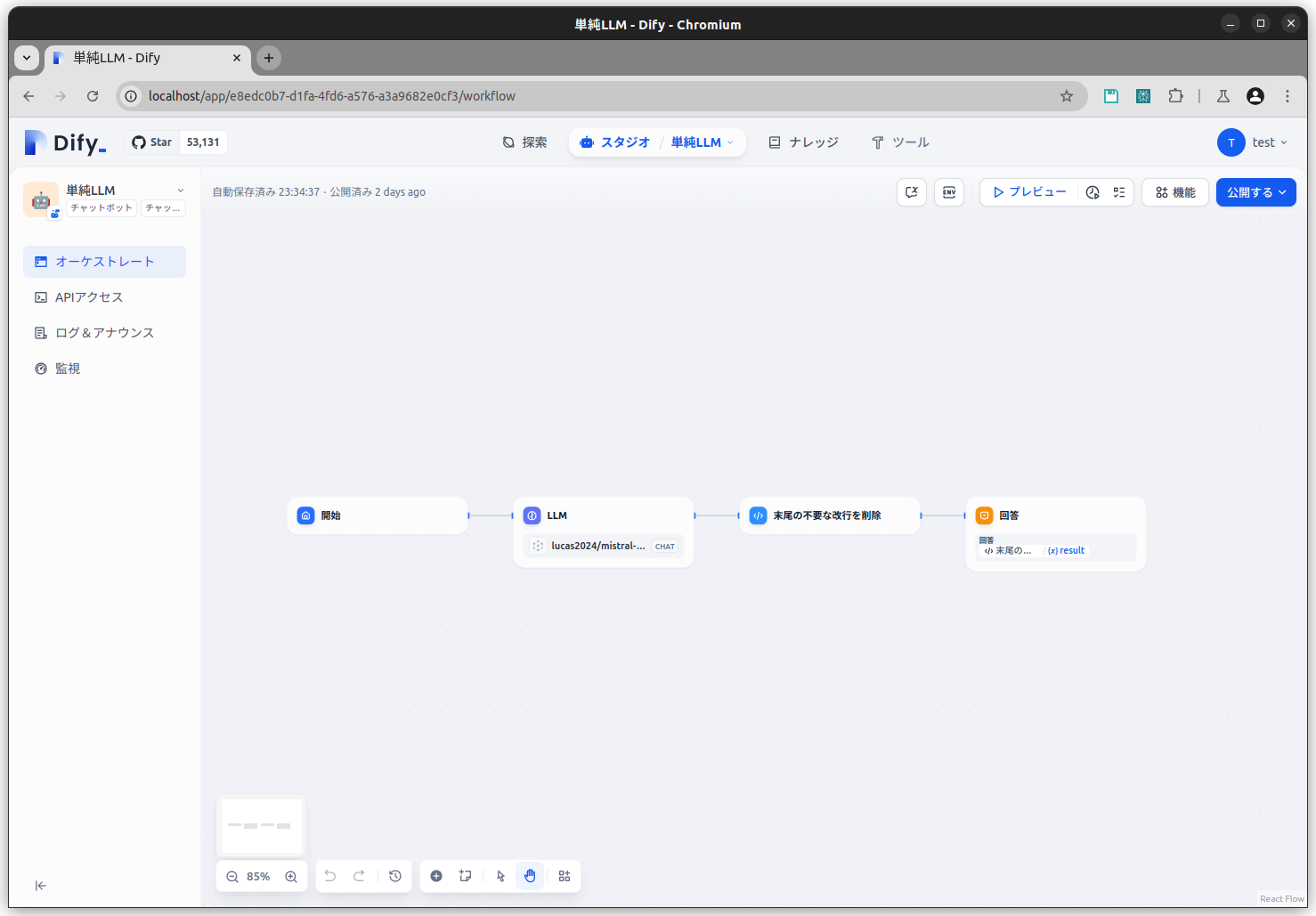
1. 会話用ワークフロー
最も基本的なチャット応答用のフローです。単純な構成ですが、Difyを挟むことでシステムプロンプト(キャラクター設定など)の調整が容易になります。
2. ネット検索用ワークフロー
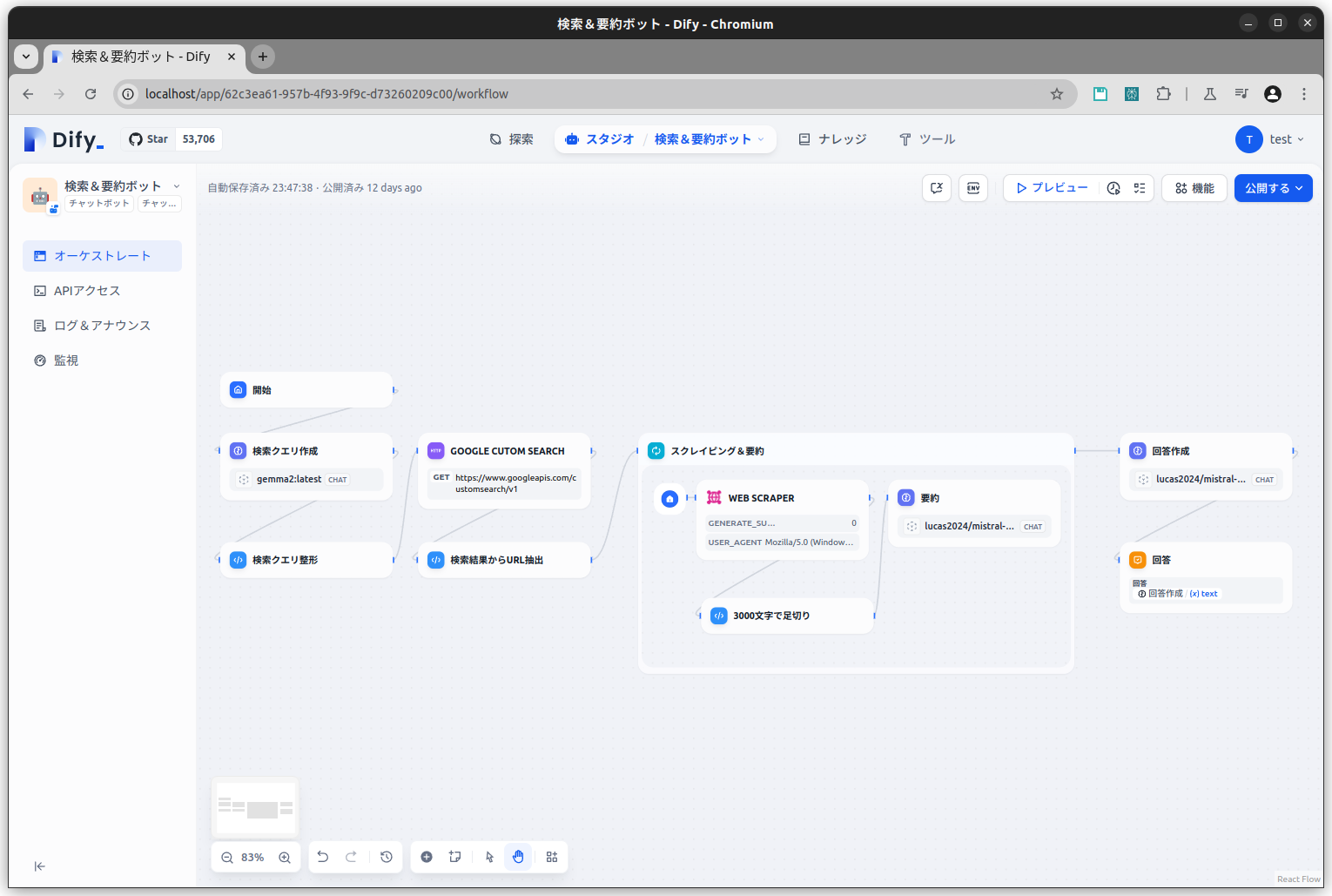
「質問。〇〇について教えて」と入力された場合に発動します。Google検索を行い、その結果を要約して回答します。
ローカルLLMは最新情報に弱いため、検索ツールを組み合わせることで弱点を補完しています。
3. 画像認識(マルチモーダル)ワークフロー
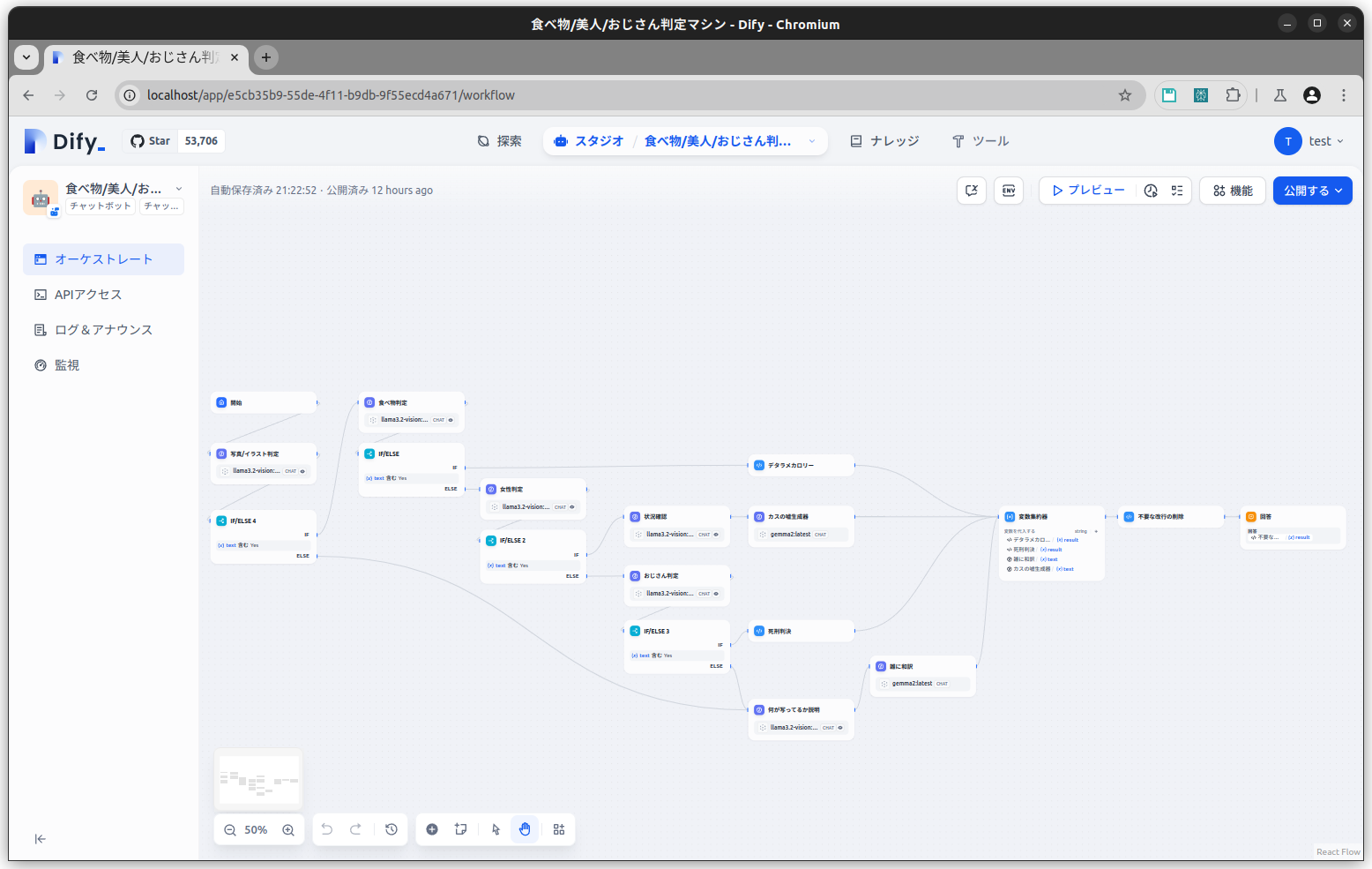
LINEで送信された画像を解析するフローです。
Llama 3.2 Vision などのマルチモーダルモデルを使用し、「画像に何が写っているか」を判定します。人物の性別や状況に応じてリアクションを変えるなど、条件分岐のテストとして実装しました。
まとめ:ローカル環境だからこそできる自由な開発
ローカル環境でDifyとLLMを動かす最大のメリットは、コストゼロ(電気代のみ)で何度でも試行錯誤できる点と、データが外部に漏れない安心感です。
今回の構成を使えば、LINEという身近なインターフェースを通じて、自作の最強AIアシスタントをいつでも呼び出すことができます。ぜひ、オリジナルのLINE Bot開発に挑戦してみてください。
【推奨】業務システム化に有効なアイテム
生成AIを学ぶ


システム化のパートナー(ミラーマスター合同会社)


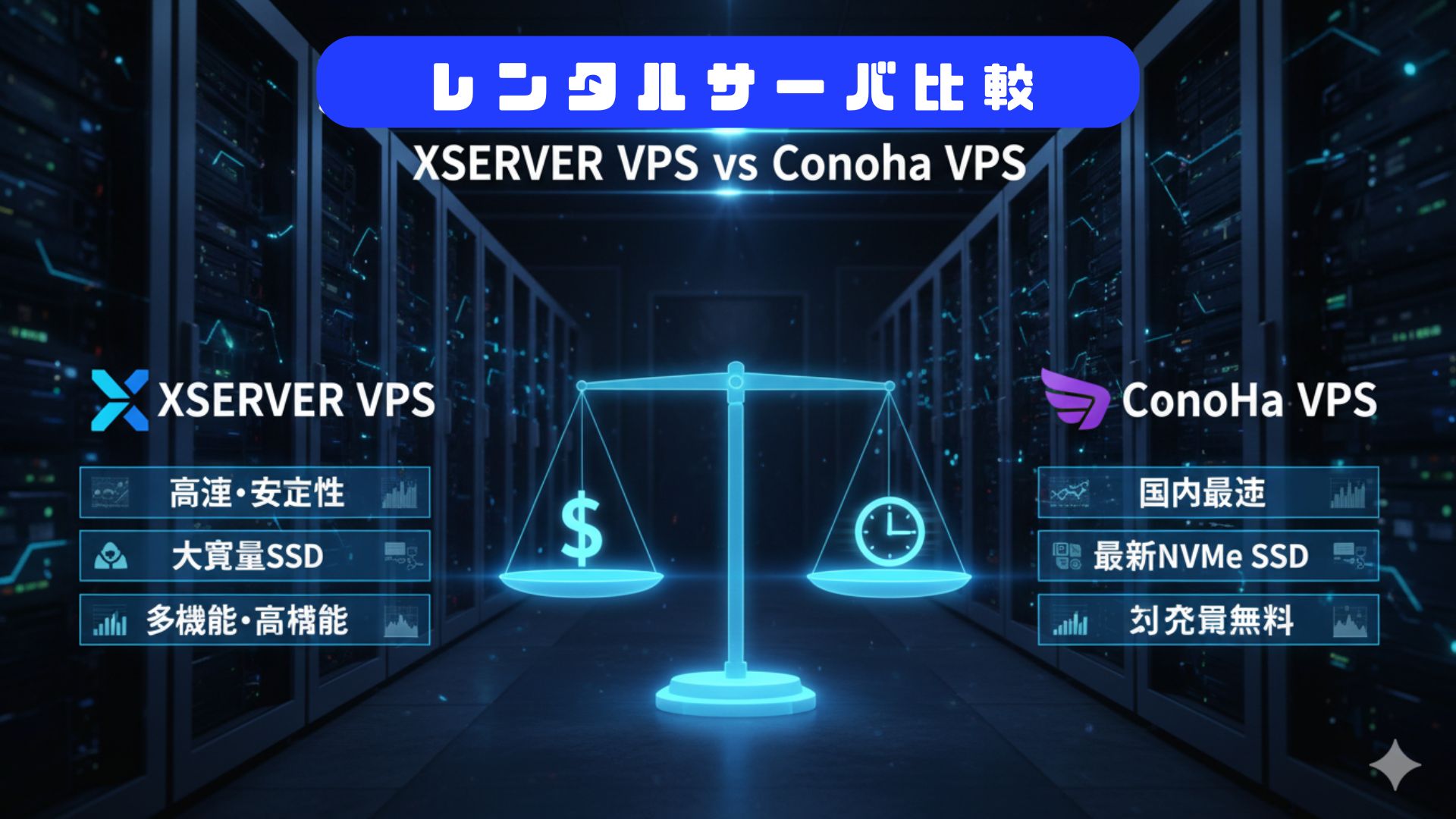
VPSサーバの選定

コメント